Team Members:
Project Summary
This project is a recommendation and vehicle analysis system, which pulls from real automotive data to help users make better decisions based on their needs and preferences. Users are able to find a recommended vehicle based on certain trip requirements and priority rankings set by the user for factors like number of passengers, distance, luggage, fuel efficiency, comfort, range, and speed. Analytical tools are provided for users to compare the fuel efficiencies of different vehicle types by filtering real data to calculate an average MPG values to test the user’s assumption. The system can also estimate a new vehicle’s fuel efficiency, given parameters like engine displacement and vehicle type. It also includes a feature that takes a budget and distance from the user and returns the maximum number of passengers possible and maximum luggage that can be carried. This is primarily an optimization concept, which seeks to maximize fuel efficiency for trips, so that users can get the most for the least amount of money.
During the project, I practiced important skills like keeping code organized with separate Java classes, using external libraries like Vaadin, and working with ArrayLists.
Development Process
The original goal was to have two functionalities, one that provided a car type for a journey based on a user’s inputs, and the other would allow a user to check their assumption about a vehicle’s fuel efficiency. We wanted to create a program that would help optimize fuel efficiencies for users going on trips, to help them save money. We had to build off of our original idea, since it was too short. A regression model was added to test a user’s input for a new car with certain characteristics. Also, we added a functionality for users to input the distance and budget they have for a trip. These additional functionalities gave us the length and complexity that we were originally lacking. We encountered the obstacle of our program being too short and not complex enough, but also had issues with how to divide up the work. Using our weekly schedule that we created for our weekly check-ins, we assigned tasks to each member, which helped us understand our exact goals. The final project came out almost exactly like we expected, so that was good.
Key Features
Page 1
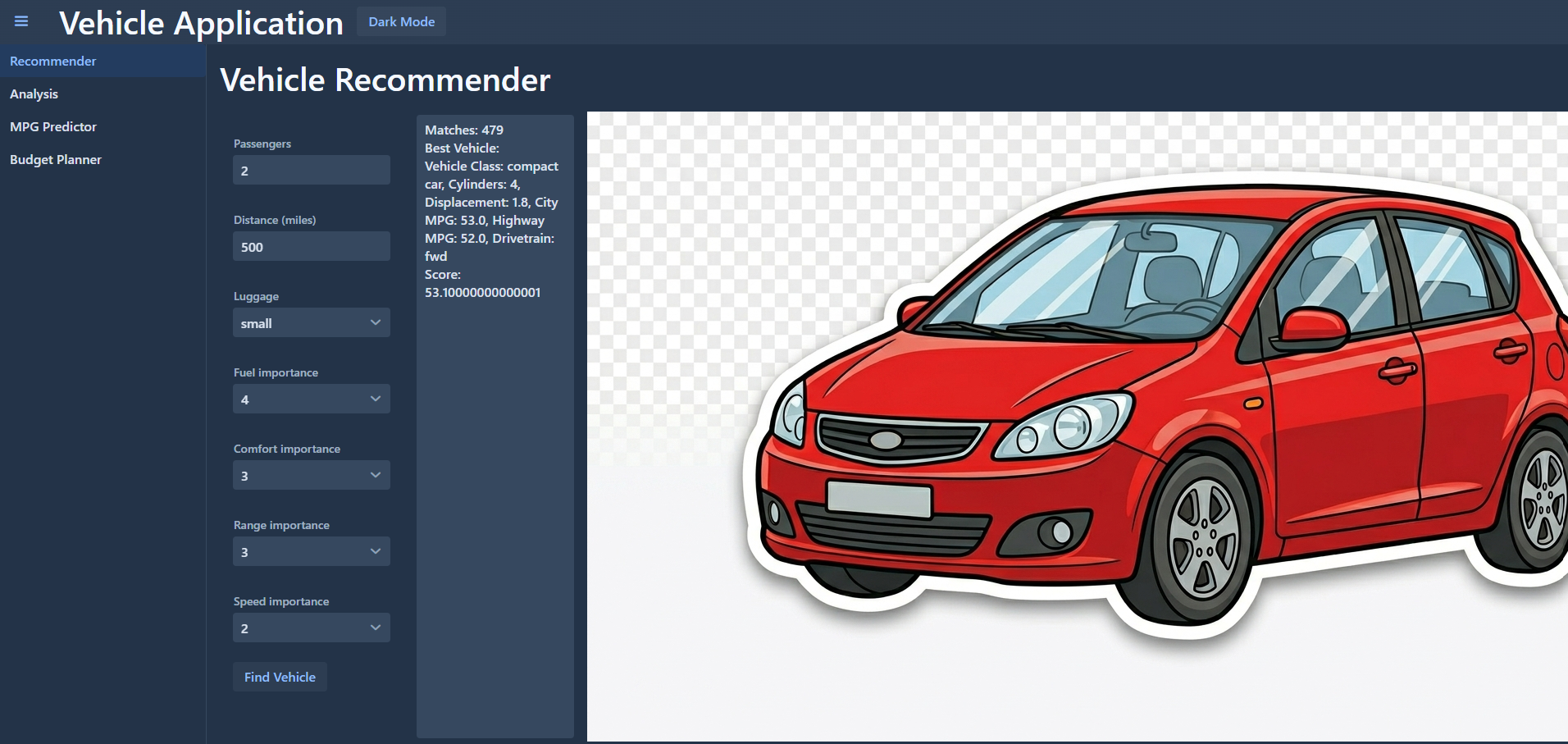
On this page, the user inputs the number of passengers, distance of the trip, and the amount of luggage for the trip. Then, they enter how important each category is, on a scale of one to 5. The program takes the input and uses it to compare vehicles, then generates the best vehicle type for the given situation.
Page 2
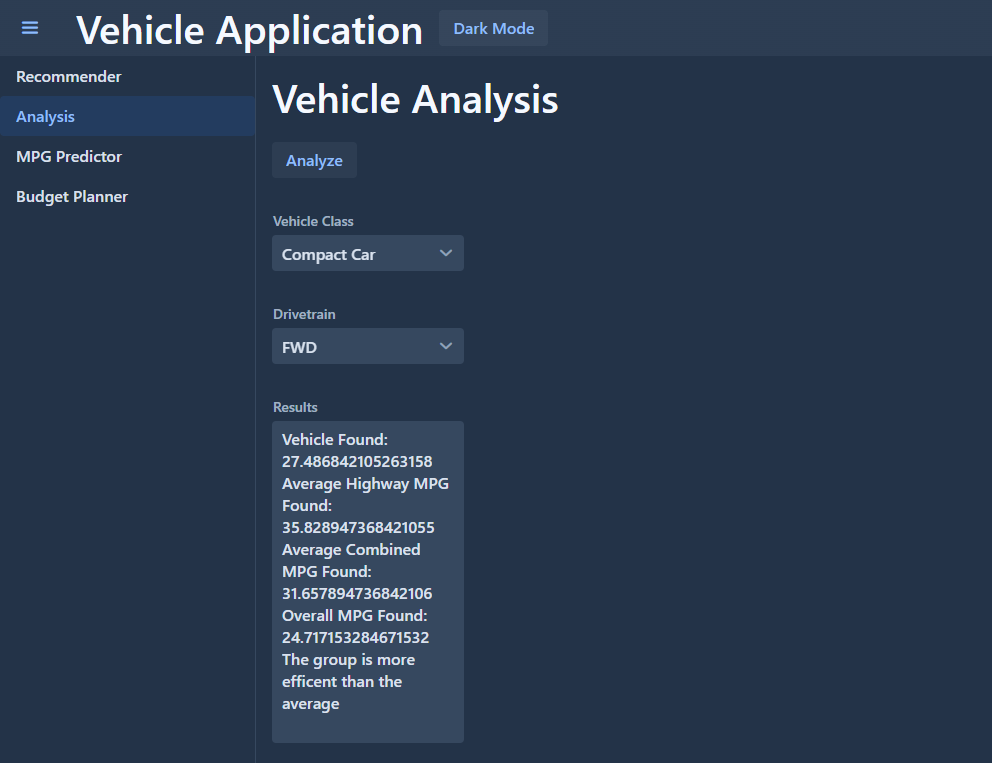
On this page users enter a body style and drivetrain configuration. Using actual data, the program will analyze vehicles with the combination entered and determine the average fuel efficiency, while comparing it to other groups to determine if the user’s assumption about their combination was correct.
Page 3
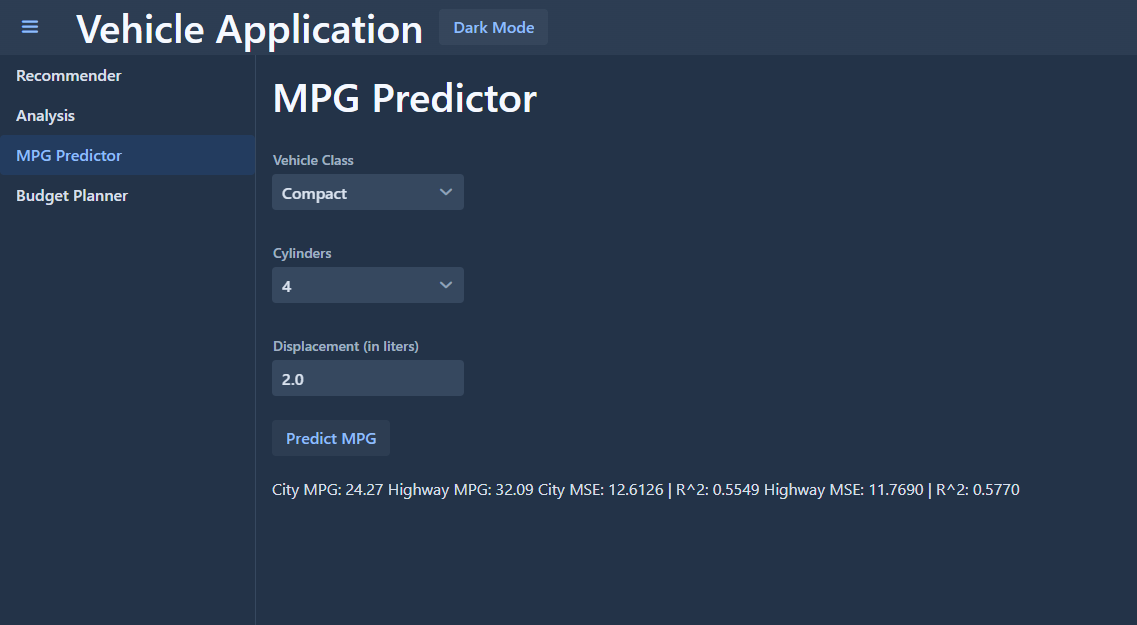
Users enter the body style, number of cylinders, and the engine displacement (in liters) into the respective boxes. The program then uses real data, combined with a regression model to estimate the vehicle’s city and highway fuel efficiencies. It also displays the mean squared error and R squared to show the accuracy of the prediction.
Page 4
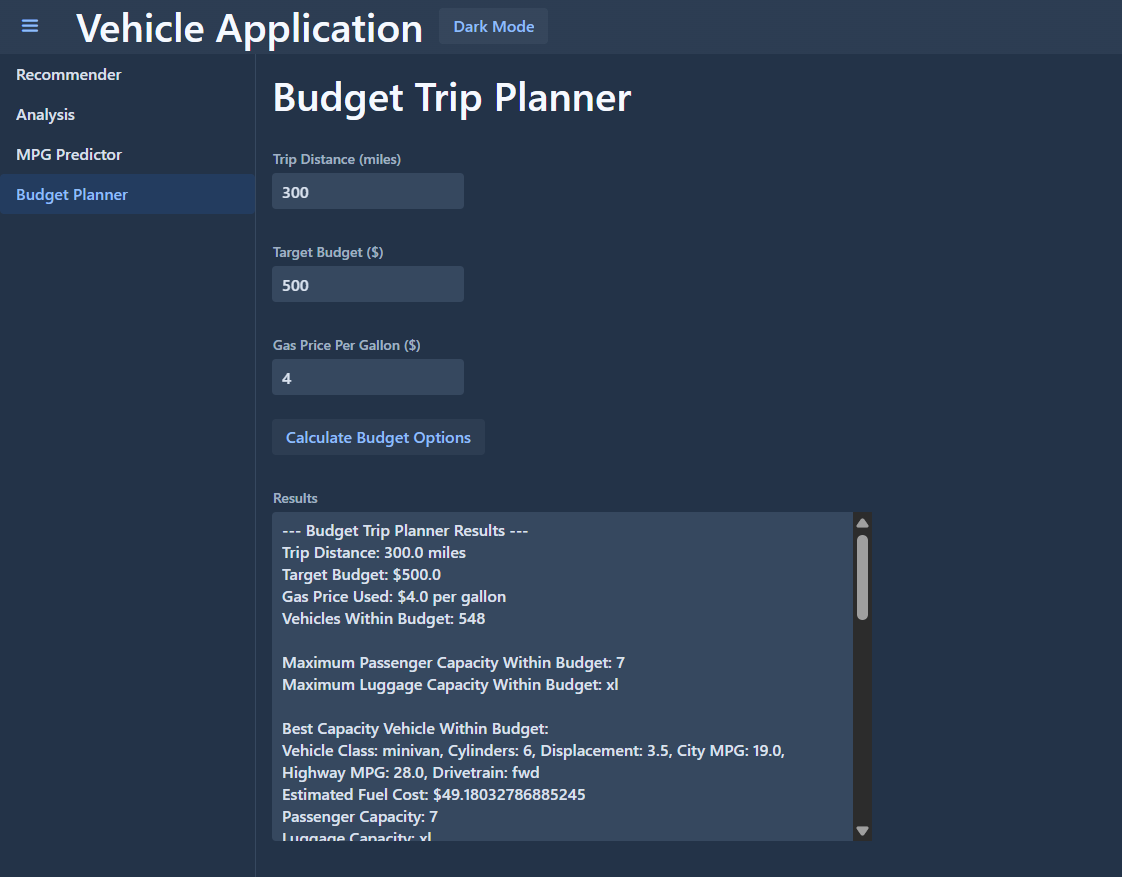
On the last page, users enter the distance they plan to travel along with their budget for the trip. For this, the program works in reverse from the first functionality, where it calculates the maximum number of passengers and luggage that can be supported within the budget. It will then show the best vehicle type for the information given.
Reflection
I learned how object-oriented design helps to organize complex logic into more manageable sections. For example, the regression logic being in its own class made it much easier to train the model and maintain organization. For debugging, I learned how easily a few small mistakes (like not putting the interface code in a method inside of a class) can alter the functionality of the UI, and how careful you must be when creating these programs.
Transforming a simple user input section from the Main java class to a more robust UI in Vaadin is something I’m proud of. While it wasn’t very difficult, it’s very nice to see how far I have come as a coder, and how capable I am.
I grew a lot in terms of problem solving. For a while I could not figure out why the UI would not load, so having to understand exactly how the UI functions helped me grow as a coder. I also think that I improved at breaking problems into smaller pieces. For example, worrying about coding the logic for the calculations, then the code for user input, then the UI, rather than trying to complete it all at once.
I feel a lot more confident with connecting logic to a user interface, like Vaadin. Most of the work that I did before (to my memory), started with doing all of the logic in Vaadin, but I think I much prefer doing all of the logic, then going back to connect it later. I also feel that by just using it more, I have a better understanding of how Vaadin works.